

How to Build a Simple Business Chatbot
How to build a simple business chatbot: a quick prototype is realistic, a reliable one takes more. Steps, tools, testing and when to ask for help.
By Muhammad Shahbaz · · 3 min read
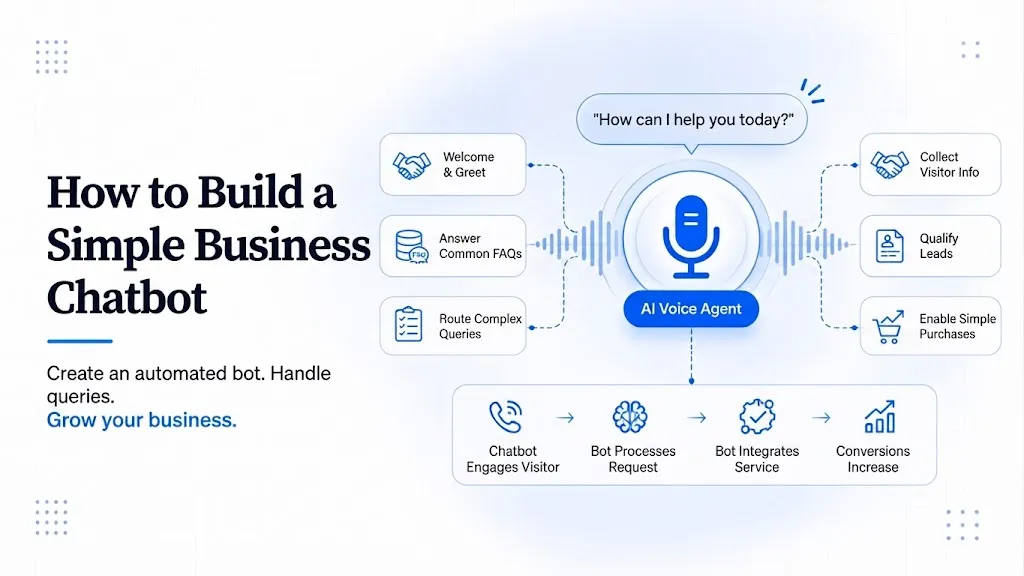
The short answer: You can make a basic prototype chatbot in an afternoon with no-code tools. A chatbot customers can rely on takes longer, because you must prepare accurate answers, test it with real questions and set up a handover to a person. Start small, test hard, then widen.
Step 1: Define one job
Pick one: answer common questions, collect lead details, or book appointments. A bot that tries everything usually does nothing well.
Step 2: Prepare the answers
Write the 20 questions customers ask most, with short and correct answers. Use real messages from your inbox or WhatsApp. Include prices, hours, policies and what the bot must not answer.
Step 3: Choose a tool
- No-code chatbot builders let you upload your FAQ and embed a widget. Good for prototypes and simple websites.
- Workflow tools such as n8n or Make connect an AI model to your systems. Good when the bot must look up data or create records.
- Custom build is better when you need security, special integrations or high volume.
For WhatsApp, you need the WhatsApp Business Platform, and Meta charges per message. Check the official page before budgeting (Meta).
Step 4: Test with real questions
Ask it your 20 questions, then ask 20 questions it should not know. Check that it says "I don't know" and offers a person, instead of making up an answer.
Step 5: Add a handover
Give a visible way to reach a human. Gartner found that 60% of surveyed customers feared AI would make it harder to reach a person (Gartner). A bot with no exit loses trust.
Step 6: Launch and review
Publish on one page or one channel. Read the conversations weekly. Fix wrong answers. Track resolved chats and handovers (metrics).
Prototype versus production
| Prototype | Production | |
|---|---|---|
| Purpose | Test the idea | Serve real customers |
| Data | A short FAQ | Checked, updated content |
| Handover | Optional | Required |
| Security | Basic | Access limits, logs |
| Monitoring | None | Weekly review |
When to ask for help
If the bot must read your orders, CRM or invoices, or if it will handle customer data, get it built properly. Stuck Media offers a $700 Automation Audit, credited to a build. See services and pricing.
When a prototype is not enough, read the questions to ask a chatbot developer. Our AI chatbot service covers production builds.
Sources
- Gartner, Gartner Survey Finds 64% of Customers Would Prefer That Companies Didn't Use AI for Customer Service (9 July 2024): https://www.gartner.com/en/newsroom/press-releases/2024-07-09-gartner-survey-finds-64-percent-of-customers-would-prefer-that-companies-didnt-use-ai-for-customer-service
- Meta, Pricing on the WhatsApp Business Platform (developer documentation): https://developers.facebook.com/documentation/business-messaging/whatsapp/pricing
- chatbots
- no-code
- quick-start
- tutorial
- DIY
FAQ
Questions on this topic. Answered.
Can I build a chatbot without coding?
Yes, for a simple FAQ bot. No-code builders let you upload content and embed a widget. For integrations with your systems, you will need workflow tools or a custom build.
How long does it take to build a chatbot?
A prototype can be done in an afternoon. A reliable version needs time for accurate content, testing and a handover to a person.
Do I need the WhatsApp Business API for a WhatsApp bot?
For a real chatbot, yes. The standard WhatsApp Business app does not provide a bot API. Meta charges per message, so check its pricing page.
Comments
Questions or thoughts? Leave a comment.
Keep reading
More from the blog on similar topics
 Chatbots
What a WhatsApp Business Platform chatbot is, how Meta per message pricing works, opt-in rules, use cases and how to start.
· 6 min read
 Chatbots
A practical checklist for hiring a chatbot developer: data handling, hosting, human handover, WhatsApp costs, code ownership and support.
· 4 min read
 Chatbots
When to use an AI chatbot, when to use a person, and how to hand over between them without annoying customers. Includes Gartner and NBER findings.
· 3 min read
Tell us what’s stuck. We’ll show you what to automate first.
A 30-minute call with the engineer who would build it. You leave with a clear next step, whether or not we work together. We reply within one working day.