AI Workflow Automation
Master AI workflow automation in 2026. Learn how to connect Zapier, Make, and n8n with AI to eliminate manual data entry and scale your business operations.
The Ultimate No Code Guide for Growing Businesses (2026)
The primary bottleneck in growing businesses isn’t a lack of effort; it’s the friction of manual hand offs. When your team spends half their day copying data from contact forms into CRMs, manually alerting account managers, or downloading email attachments to drop them into cloud storage, growth stalls.
AI workflow automation changes this dynamic. By combining traditional API integration tools like Zapier or Make with the reasoning capabilities of large language models (LLMs), businesses can automate entire complex operations, not just simple data entry.
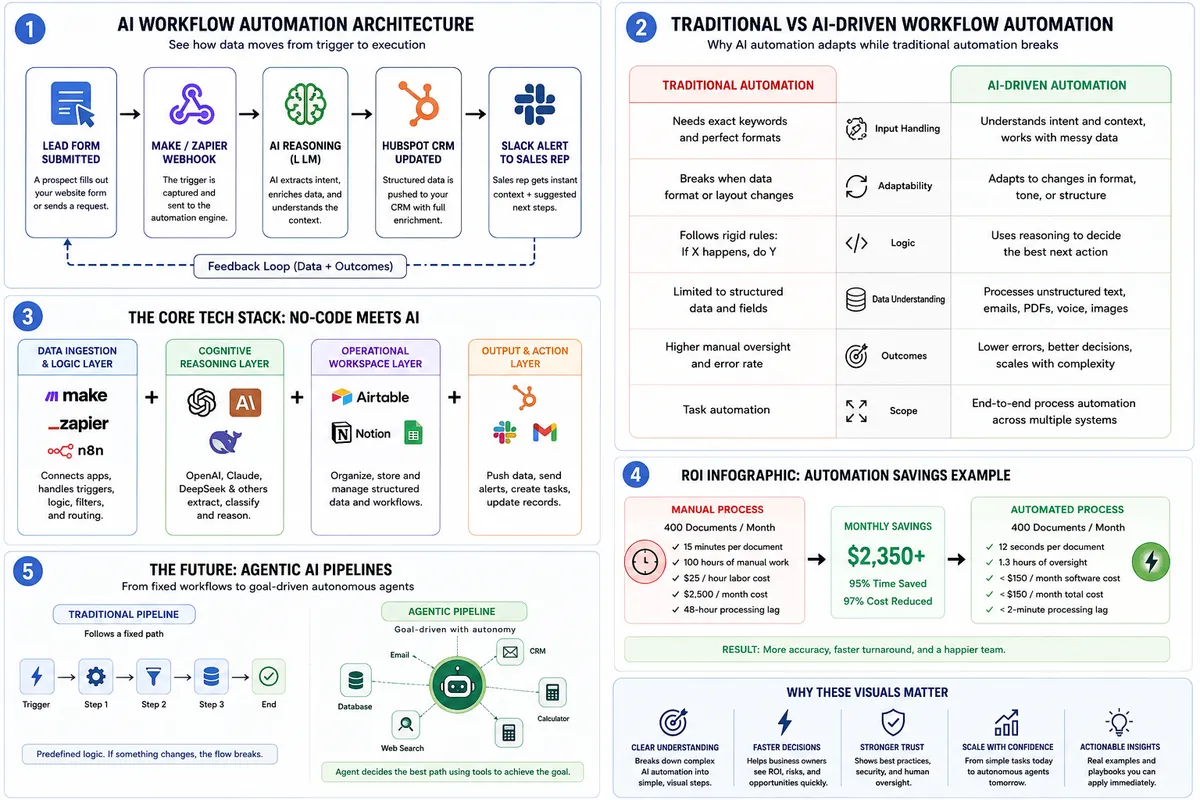
Table of Contents
1. What is AI Workflow Automation?
2. How It Works: Anatomy of an Automated System
3. The Core Tech Stack: No-Code Meets Artificial Intelligence
4. Real World Examples & Operational Playbooks
5. Calculating the ROI of Automation
6. Common Traps and How to Evade Them
7. The Future: The Shift to Agentic Pipelines
8. Frequently Asked Questions
1. What is AI Workflow Automation?
Traditional automation relies entirely on rigid rules. If X happens, do Y. If an email arrives with the subject line "Invoice," download the attachment. But what happens if a client writes "Hey, here is the bill from last week" instead? The traditional script breaks.
AI workflow automation introduces a layer of cognitive reasoning into these processes. It pairs traditional data pipelines with an AI model that can read, classify, and make decisions based on unstructured data.
[Traditional Automation] ──> Needs Exact Matches ──> Fails on Unstructured Text
[AI Driven Automation] ──> Understands Intent ──> Adapts to Varied Inputs
*The Enterprise Reality: According to the McKinsey Global State of AI Report, 88% of organizations now regularly utilize AI in at least one business function. However, McKinsey notes that only 33% have scaled these programs enterprise wide. The companies pulling ahead are those transitioning away from isolated AI prompts and moving toward deeply integrated, cross platform systems.
2. How It Works: Anatomy of an Automated System
An automated pipeline runs through a distinct, multi stage life cycle. Instead of viewing it as a black box, look at how data moves through a system:
Phase 1: The System Trigger
Every process requires a starting event. This could be an incoming web hook from your website, an unread message in a shared support inbox, or a new row added to a tracking spreadsheet.
Phase 2: AI Interpretation
The raw data is handed off to an LLM via an API call. Rather than just parsing text, the model extracts core context. It identifies sentiment, summarizes long text, or translates language into structured fields.
Phase 3: Smart Filters
The pipeline runs the AI's output through conditional logic. For example: If the extracted customer sentiment is categorized as "Highly Frustrated," the pipeline routes the ticket directly to a senior manager via Slack. If it’s a standard feature request, it files it in Jira.
Phase 4: Final Execution
The system pushes the finalized, structured data into your core software tools. It updates your CRM, generates an invoice, drafts a personalized contextual email reply, or schedules a task for your team.
3. The Core Tech Stack: No Code Meets Artificial Intelligence
Building these pipelines no longer requires a massive team of internal software engineers. A highly functional modern stack typically pairs visual integration canvases with specialized AI APIs.
| Platform Layer | Primary Tools | Core Role in Your Pipeline |
|---|---|---|
| Data Ingestion & Logic | Make, Zapier, n8n | Serves as the nervous system. It moves data between your daily apps via webhooks and APIs. |
| Cognitive Reasoning | OpenAI API, Anthropic Claude, DeepSeek | The brain layer. Extracts data, classifies intent, and handles unstructured text or voice. |
| Operational Workspace | Airtable, Notion, Custom Hubs | The central database where automated data is organized, reviewed, and stored. |
Choosing Your Engine: Make vs. Zapier
-
Zapier is built for rapid deployment. It features the largest library of pre built app integrations and is ideal for straightforward, linear flows.
-
Make offers a visual, multi branch canvas built for complex systems. It handles advanced data mapping, looping arrays, and complex conditional paths at a significantly lower per task cost.
4. Real World Examples & Operational Playbooks
To make the power of automation tangible, let’s look at how these systems transform specific business units.
Playbook A: Inbound Lead Triage and Contextual Enrichment
When a prospect submits a contact form, speed and context determine your close rate.
-
The Blueprint: A form submission fires a webhook to Make. The system uses an LLM to scan the lead's company website and analyze their raw message.
-
The Result: The system populates your CRM with company size, industry vertical, and explicit pain points. Simultaneously, it sends a Slack alert to your sales rep containing a bulleted summary of the lead and three custom pitch angles before the rep even opens the record.
Playbook B: Intelligent Support Ticket Routing
The Blueprint: Customer emails pass to an AI categorization engine. The engine determines the underlying issue (e.g., Billing, Bug Report, General Question) and evaluates urgency.
The Result: High urgency billing bugs are instantly escalated to engineers via Pager Duty. Routine account questions receive an automatically drafted draft reply inside Zen desk, waiting for a human rep to review and click send.
Stuck Media Field Note: When we build internal systems for our clients, we consistently find that the fastest, highest impact wins come from automating document-heavy internal operations first. Optimizing your back office contract parsing, billing reconciliations, and lead data formatting creates immediate operational breathing room before you ever attempt to automate customer facing communication.
5. Calculating the ROI of Automation
Automation is an investment, and it should be measured with clear financial metrics. Deloitte's State of AI in the Enterprise Report indicates that 40% of organizations successfully leverage AI to achieve explicit operational cost reductions, while 66% report measurable productivity and efficiency gains.
Case Study: High Volume Document Ingestion
Consider a mid sized operation managing roughly 400 vendor invoices or client on boarding documents each month.
-
The Manual Path: A team member spends 15 minutes per document downloading, reading, manually extracting line items, typing them into accounting software, and filing the PDF. At $25/hour, this costs the business $2,500 monthly in raw labor, alongside a slow 48-hour processing lag.
-
The Automated Path: An n8n pipeline reads the incoming document via an AI Vision API, extracts the line items into structured JSON, updates the database, and flags anomalies. The entire run takes 12 seconds, costs less than $150 total in monthly software subscriptions, and achieves a processing lag of under 2 minutes.
6. Common Traps and How to Evade Them
Building successful automated pipelines requires sidestepping a few frequent engineering errors.
-
Trap 1: Forgetting the Human in the Loop. Never allow an un monitored AI model to execute high-stakes external actions such as sending final invoices or responding to delicate customer disputes without a human validation gateway. Build systems that prepare drafts for review rather than taking autonomous action.
-
Trap 2: Ignoring Data Security. Passing sensitive client data or proprietary medical information through unauthorized public APIs creates severe compliance liabilities. Ensure your tech stack utilizes enterprise grade API endpoints that explicitly state your input data will not be used to train future public foundational models.
-
Trap 3: Over complicating Simple Tasks. If a workflow can be perfectly handled with a basic filter or an IF statement, do not add an AI prompt to it. AI should only be deployed where semantic understanding, text summary, or pattern recognition is explicitly required.
7. The Future: The Shift to Agentic Pipelines
We are rapidly moving past linear automation pipelines. The current shift is moving heavily toward Agentic AI.
Traditional pipelines follow a strict, predefined map from point A to point B. AI Agents, by contrast, are given a specific goal, an array of digital tools (like access to a CRM, an email client, and a calculator), and the autonomy to determine the best sequence of actions to hit that goal.
Deloitte’s latest data shows a massive forward looking shift here: 74% of enterprises plan to deploy agentic AI within the next two years. Future operations will feature specialized clusters of autonomous agents working collaboratively across platforms, detecting and resolving common data discrepancies without human oversight.
8. Frequently Asked Questions
Do I need to know how to code to set up AI automation?
No. Visual, modern canvas tools like Make and Zapier handle the underlying code structures entirely. Your primary focus is structuring clear data logic, mapping variables, and writing explicit prompts for the AI steps.
How do we handle AI hallucinations or errors in a pipeline?
We implement structured data validation layers. You can configure your systems to check AI outputs against pre set rules (like verifying a date format or checking if a number falls within an expected range). If the validation check fails, the pipeline halts and routes the item to a human queue for manual review.
What is the typical time frame to see positive ROI?
Simple data pipelines (like automated CRM syncs or quick lead enrichment systems) usually return their build time in saved hours within the first 30 to 45 days. Broader, enterprise-wide process overhauls generally achieve full cost amortization within 6 to 12 months.
While basic setups can handle linear tasks, the true scale happens when you orchestrate multi app systems. For a comprehensive operational blueprint on connecting visual integrations with advanced LLMs, explore our complete guide to AI Automation
While basic setups can handle linear tasks, the true scale happens when you orchestrate multi app systems. For a comprehensive operational blueprint on connecting visual integrations with advanced LLMs, explore our complete guide to AI Business Automation
About the Author
Stuck Media is a knowledgeable contributor sharing expertise and insights on technology and business topics.
Comments
Leave a Comment
Your comment will be reviewed by our team before appearing.
Loading comments...