Intelligent Automation
Intelligent Automation explained: learn how AI, RPA, and workflow automation improve business processes with real examples, tools, benefits, and implementation.
The Complete Guide to AI Powered Business Process Optimization (2026)
Executive Summary: The 60 Second Takeaway
Your business doesn't have a people problem. It has a workflow problem. Employees spend hours copying information between emails, spreadsheets, CRMs, and internal systems. Every manual hand off increases delays, errors, and operating costs.
Intelligent Automation (IA) replaces these repetitive processes with AI powered workflows that understand documents, make decisions, and complete work automatically. By giving your automation engines the ability to read, reason, and make smart choices, you can finally automate complete, cross department operations rather than just isolated tasks.
1. Quick Answer & Key Takeaways
What is Intelligent Automation? Intelligent Automation combines artificial intelligence technologies like machine learning and language models with traditional execution tools to handle complex business workflows that normally require human judgment and decision making.
Intelligent Automation allows software to understand messy documents, customer emails, and real world business data before taking action automatically. By integrating advanced language models directly into modern visual builders like Make, Zapier, or n8n, you build resilient pipelines that adapt dynamically to real world variables. To understand how to establish these core visual foundations, see our definitive guide on AI Automation.
3. How Intelligent Automation Works: The Operational Pipeline
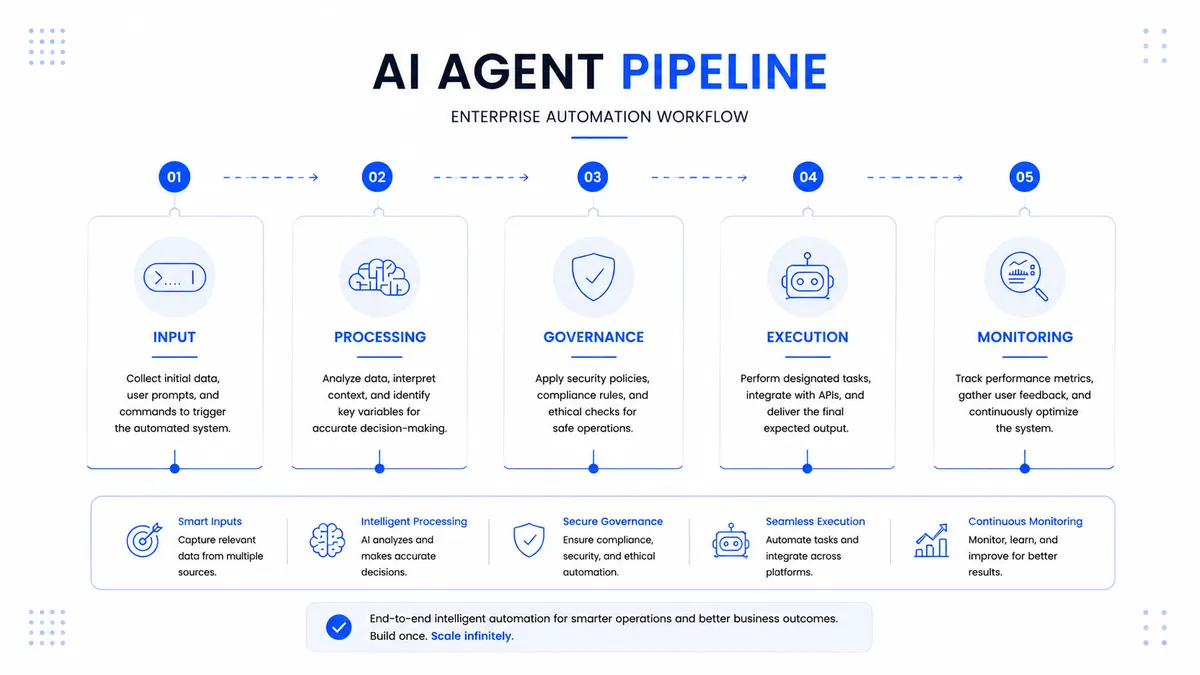
An enterprise grade IA setup functions as a continuous intake pipeline, transforming messy real world files into clean data entries and instant system actions.
The 5 Phase Intelligent Automation Pipeline
-
1. Raw Data Collection (Phase 1: Intake)
Unstructured files like a customer invoice or a vendor inquiry enter the workflow automatically via an active webhook or cloud folder monitor.
-
2. Visual Text Reading (Phase 2: Scanning)
Advanced layout engines read the document structure, cleanly separating raw text blocks from background lines, corporate logos, and complex image layers.
-
3. AI Decision Layer (Phase 3: Context Review)
A language model reads the text payload, evaluates customer intent, extracts target variables (like totals or dates), and instantly structures it into organized data rows.
-
4. Validation Gate Routing (Phase 4: Safety Check)
Internal business filters cross-check the extracted data points against fixed safety bounds. If a figure looks suspicious, the pipeline automatically alerts a manager via Slack.
-
5. System Integration Sync (Phase 5: Execution)
The verified data writes directly into central core applications like Salesforce, HubSpot, or internal billing databases via a secure, encrypted API connection.
4. The Core Technologies Behind IA
Intelligent Automation isn't an isolated tool you install. It is an ecosystem of specialized components working together seamlessly:
-
Large Language Models (LLMs): The core AI decision layer that interprets human intent and extracts specific variables from messy documents.
-
Natural Language Processing (NLP): Foundational text analysis systems that monitor client -sentiment and track incoming communication types.
-
Robotic Process Automation (RPA): The hands of the workflow software designed to interact with legacy systems, click on screen buttons, and handle basic data entry.
-
Computer Vision & Layout OCR: Visual analysis tools that read document geometries, scan wrinkled receipts, and extract text from images.
-
Generative AI Platforms: Flexible workflow builders (like Make or n8n) that tie models, rules, and APIs into automated business pipelines.
5. Strategic Comparison Frameworks
Let's cut through the industry buzzwords to see exactly how these technical approaches compare across day to day operations.
Intelligent Automation vs. AI Automation
| Metric / Feature | Intelligent Automation (IA) | AI Automation |
|---|---|---|
| System Approach | Balances RPA execution with cognitive models | Focuses heavily on the core AI reasoning steps |
| Legacy Adaptability | Bridges old desktop applications with modern cloud APIs | Prefers modern, API native software environments |
| Operational Scope | Cross department, end to end transformations | Modular, task specific workflow optimizations |
For a step by step breakdown of how to design task specific pipelines, explore our tactical guide to AI Workflow Automation.
Intelligent Automation vs. Traditional RPA
| Metric / Feature | Traditional RPA (Legacy) | Intelligent Automation (Modern IA) |
|---|---|---|
| Data Intake Type | Highly structured files only (perfect CSV forms) | Varying, messy data points (understanding documents) |
| Processing Paths | Strict linear steps; fails instantly on updates | Multi branch routing driven by contextual logic |
| Maintenance Burden | High upkeep costs whenever software layouts shift | Flexible logic steps updated easily via clear prompts |
Intelligent Automation vs. Hyperautomation
| Metric / Feature | Intelligent Automation (IA) | Hyperautomation |
|---|---|---|
| Strategic Focus | Optimizing specific business workflows using smart models | Automating every possible process in an entire company |
| Tech Footprint | Focused setups (RPA + APIs + AI Models) | Massive tool arrays (Process mining, low code suites) |
6. Original Data & Market Realities
Stuck Media Internal Findings: The Top 5 Manual Bottlenecks
After auditing automation opportunities across mid market and enterprise businesses, our internal consulting operations consistently track five severe manual administrative bottlenecks. These five business workflows usually deliver the fastest return on automation investment:
1. Invoice Processing: Manual extraction of line items, billing matching, and manual vendor payment entry.
2. CRM Updates: Transferring account details, conversational logs, and contract requirements by hand from emails to account cards.
3. Lead Qualification: Reviewing inbound discovery forms, scanning website profiles, and manually segmenting prospects.
4. Document Classification: Sorting incoming service support files, legal compliance paperwork, and client uploads into secure storage buckets.
5. Internal Reporting: Pulling metric data sets from distinct platforms manually to assemble weekly executive dashboards.
Industry Growth Trends
Data from major global technology studies highlights how rapidly the modern business baseline is shifting toward automated infrastructure:
Intelligent Automation Industry Trends
| Industry Metric | Verified Trend Source | Operational Significance |
|---|---|---|
| 15× Growth in AI Agents | Microsoft Work Trend Index | Rapid enterprise adoption of autonomous software workers. |
| 50–55% Work Redesign | McKinsey Global Institute | Business processes are actively shifting toward manager oversight roles. |
| 19% Frontier Maturity | Harvard Business Review | Most companies are still early, creating a massive competitive edge for early adopters. |
| 50% Quality Control Focus | MIT Sloan Management Review | Modern operators prioritize human verification steps over simple data entry tasks. |
7. Proven Industry Case Studies
1. Corporate Finance: Invoice Processing at Scale
-
The Problem: A high volume enterprise logistics provider faced an administrative bottleneck, with thousands of irregular vendor invoice PDFs overwhelming their accounting staff.
-
Old Process: Four full time employees manually opened emails, reviewed PDF files line by line, hand typed totals into an ERP system, and checked supplier records one at a time.
-
New Intelligent Automation Workflow: An automated intake hook extracts incoming PDFs, passes the text layers to a specialized vision model to map variables, runs data validation checks, and inputs the entry clean into the accounting software.
-
Business Result: The logistics provider eliminated manual data entry completely, avoided critical payment delays, and slashed invoice processing time by 86%.
2. Credit Analysis: Processing 15 Million Documentation Records
-
The Problem: A corporate financial group was buried under an ever growing mountain of client performance reports, causing long review delays and losing client deals.
-
Old Process: Under writers manually cross referenced massive PDF tables with historical databases, hand building compliance sheets for every applicant.
-
New Intelligent Automation Workflow: The group deployed a modern parsing engine that automatically structures tables into tabular records, applies internal credit rule sets, and flags boundary violations instantly for rapid human sign off.
-
Business Result: The financial group successfully managed an annual load of 15 million financial reports while dropping total manual underwriting review time by 70%.
3. Healthcare Operations: Clinical Billing Compliance
-
The Problem: Manual data entry mistakes across patient intake forms caused expensive compliance penalties and delayed insurance reimbursements.
-
Old Process: Front desk workers transcribed handwritten paper health profiles into digital patient charts, introducing recurring typing errors.
-
New Intelligent Automation Workflow: A centralized capture loop scans physical patient files, runs language extraction layers to organize medical details, checks inputs against insurance rules, and syncs data to central charts.
-
Business Result: Clinical processing speeds accelerated dramatically while data entry errors plummeted by 92%.
Stuck Media Insight: Standardize Before You Automate
During our automation projects at Stuck Media, we noticed most businesses don't struggle because of the AI's underlying accuracy they struggle because their existing human workflow is highly inconsistent. If your internal team cannot agree on a single, standardized set of logic steps on paper, an automated software agent will not fix the underlying operational confusion. Always map your step by step SOP before building on an automation canvas.
8. Navigating the Automation Tool Ecosystem
Choosing an automation platform isn't about looking at generic marketing checklists. The best architecture depends entirely on your business scale, your internal engineering skills, and your current technology stack:
-
When to use Make: Best for high growth mid market businesses. Its visual drag and drop workspace allows operations teams to build highly complex multi step workflows across cloud apps without writing complex code.
-
When to use Zapier: Perfect for fast, simple integrations. If you just need to connect two modern cloud applications via a basic linear link (e.g., “When a new Type form arrives, add a row to Google Sheets”), Zapier is the fastest path.
-
When to use n8n: Best for technical engineering teams who need complete data privacy and custom JavaScript flexibility. Because you can host n8n on your own servers, you can process sensitive data without paying expensive per transaction fees.
-
When to use Microsoft Power Automate: The definitive choice for traditional enterprise companies built entirely on the Microsoft ecosystem (Azure, SharePoint, Dynamics, and legacy on premise Windows apps).
9. Can Your Business Benefit From Intelligent Automation?
Review this immediate diagnostic checklist. If you select "Yes" to two or more of these baseline indicators, your business workflows are primed for substantial time and cost reductions:
-
[ ] Manual Invoices? Your accounting team spends hours parsing custom layouts, mismatched line items, and varied vendor receipts.
-
[ ] Manual CRM Updates? Account managers lose hours copying summaries, status changes, and email conversations into customer records by hand.
-
[ ] Excel Everywhere? Crucial business data lives scattered across disconnected offline spreadsheets that require weekly human cleanup.
-
[ ] Employees Copying Data? Workers spend large chunks of their day acting as human bridges, moving fields from one software window to another.
-
[ ] Delayed Process Approvals? Workflows constantly stall because internal approvals sit frozen in chaotic email threads or Slack channels.
10. Practical Implementation Checklist
Follow this direct roll out checklist to launch your automation pipelines safely without disrupting daily business:
- [ ] Map Your Process Logic: Document the target business workflow in plain English before building on an automation canvas.
[ ] Audit Your Inbound Data: Identify exactly where you need an AI model to read unstructured text versus where linear tools can pass basic text fields.
[ ] Configure Human Safety nets: Add explicit approval check points for any workflows that handle financial transfers or message clients directly.
[ ] Enforce Structured Formats: Use strict output prompt templates to ensure the AI engine outputs clean data schemas that won't break downstream tools.
[ ] Create Fail back Safety Filters: Set up instant Slack alerts to notify your internal team immediately if a third party software API experiences an update or downtime.
11. Risks, Pitfalls, and Challenges to Avoid
Automating a broken business process doesn't repair your workflow it simply scales your inefficiencies at a much faster rate.
Common Mistake: Skipping Post AI Data Validation
Large language models are brilliant at reasoning, but they can occasionally adjust their formatting output styles dynamically. Never let an AI's raw text dump write directly to a database without a strict parsing rule step. Always install explicit data validation filters immediately following an AI decision layer to verify variables before they sync to core applications.
Additional Bottlenecks to Watch:
-
Overusing Complex Models for Easy Tasks: Avoid wasting your API token budget by calling a top tier model for basic tasks that simple text search can handle for free.
-
Ignoring Team Change Management: Software pipelines succeed only if your team trusts them. Teach your staff that these tools are built to free them from tedious work, not to replace human oversight.
12. Measuring Explicit Value & ROI
Calculating the value of your automated workflows comes down to measuring recovered manual labor hours against software running fees. Use our baseline operational formula to calculate your returns:
ROI Formula
Projected Monthly Savings = (Monthly Task Hours Saved × Internal Labor Rate) − Software API Costs
Stuck Media Insight: The True Cost of Downtime
When building your financial models, remember that the cost of manual work isn't just the hourly wage. It's the cost of human error. We've seen single data entry mistakes in billing cost companies thousands in compliance adjustments. A highly resilient automation pipeline eliminates these financial leaks entirely.
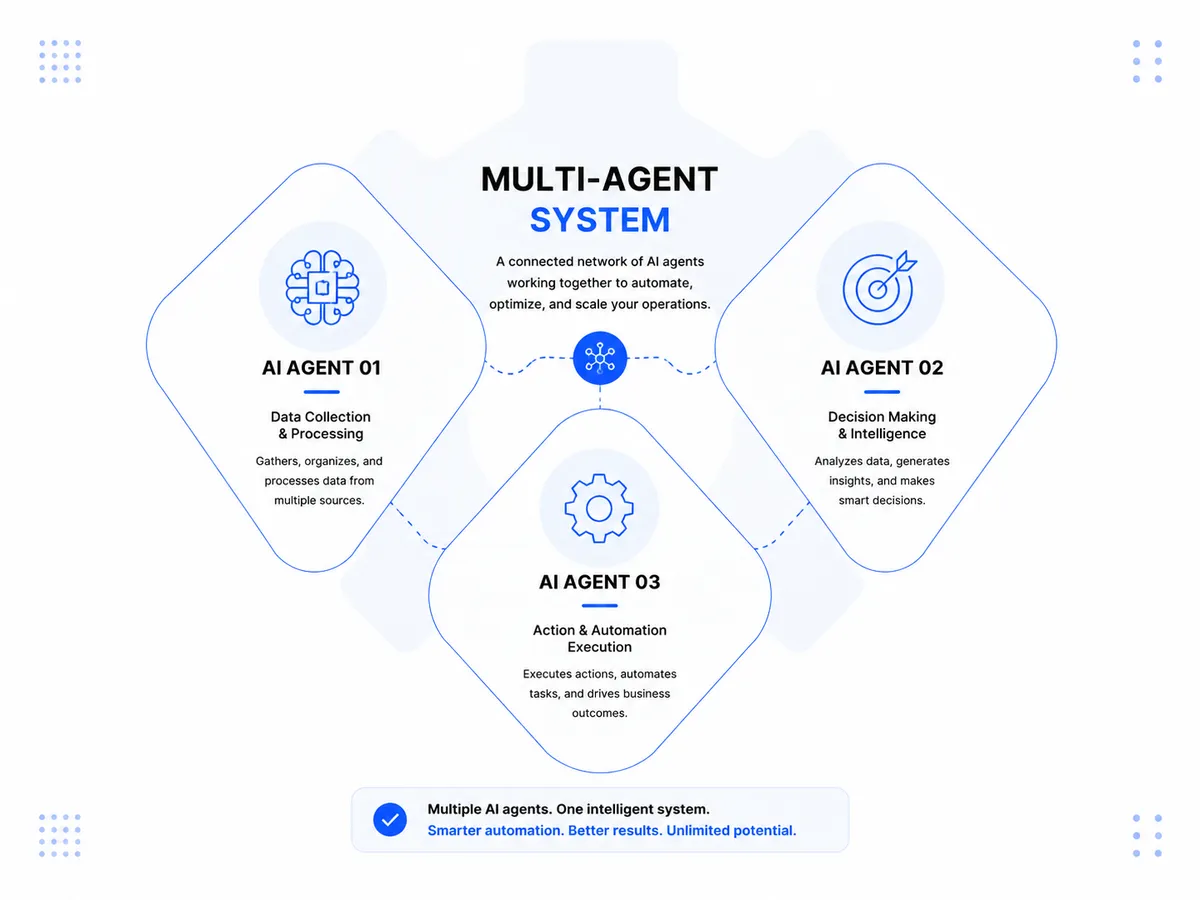
13. The Next Frontier: Multi Agent Architecture
The world of automation is shifting away from rigid, step by step paths and moving rapidly toward fully autonomous Multi Agent Architecture utilizing the modern Model Context Protocol (MCP) standard.
Instead of a fixed map where data must move blindly through predefined steps, modern infrastructure deploys specialized AI agents designed to collaborate like a real operational department:
-
The Orchestrator Agent: Reviews the overarching operational objective, divides it into distinct sub-tasks, and coordinates secondary workflows.
-
The Research Agent: Safely queries internal corporate databases and vector knowledge bases to fetch accurate context.
-
The Audit Agent: Runs continuous error checking layers across data outputs, correcting processing anomalies live without needing human engineering fixes.
This advanced model allows businesses to deploy self-correcting workflows that handle real time data adjustments smoothly, helping your operations scale around the clock. To discover how to configure these systems for your business operations, check out our guide on AI Process Automation.
14. Why Businesses Partner With Stuck Media
We don't sell generic out-of-the-box software packages or flashy, impractical AI demonstrations. We design and build enterprise-grade, resilient operational frameworks tailored strictly to your company's core challenges:
-
We Build Around Your Current Tech Stack: You don't need to rebuild your technological ecosystem. We connect directly into your existing software infrastructure via secure cloud APIs.
-
We Automate Actual Workflows, Not Operations: We document, refine, and translate your team's specific Standard Operating Procedures (SOPs) into code, keeping your unique operational advantage intact.
-
Focus on Measurable Financial ROI: We build with explicit tracking dashboards, ensuring you see exactly how many manual hours and operational dollars are recovered each month.
-
Human in the Loop Architecture: Every high stakes process we deploy includes built in safety filters and automated approval gates, keeping your leadership in ultimate control.
15. Frequently Asked Questions (FAQs)
What is Intelligent Automation?
Intelligent Automation combines artificial intelligence technologies like machine learning and language models with traditional automation platforms to handle complex workflows that normally require human judgment.
How does it work?
It operates in a continuous cycle: data is captured via webhooks, parsed by visual OCR engines, interpreted for context by a language model, verified against predefined business rules, and synced directly to your central databases.
How is it different from RPA?
Legacy RPA acts like a mechanical tool it repeats a clicking path blindly and breaks if a pixel shifts. IA adds a cognitive reasoning layer, allowing the system to read layouts and adjust to workflow changes naturally.
How is it different from AI Automation?
Intelligent Automation actively balances legacy desktop tools and RPA systems with modern AI context logic. AI Automation focus tends to stay within native, cloud based API data management and text processing.
What tools are best for building modern IA setups?
The standard modern tech stack combines visual automation platforms (Make, n8n) with advanced language model APIs (Claude, OpenAI) and central CRM architectures (HubSpot, Salesforce).
How much does an Intelligent Automation setup cost?
While enterprise platforms carry large licensing fees, mid market setups utilizing pay as you go developer APIs and usage based visual builders scale affordably, keeping software overhead low.
How long does a typical implementation project take?
Depending on system complexity and the age of your application stack, a validated production workflow pipeline usually takes between 3 to 6 weeks to fully build, test, and deploy.
Is custom coding required to run Intelligent Automation?
No. Modern visual builders manage integration code behind a visual workspace. Your team simply needs an intimate understanding of your business logic, basic prompt engineering skills, and clear process maps.
About the Author
Stuck Media is a knowledgeable contributor sharing expertise and insights on technology and business topics.
Comments
Leave a Comment
Your comment will be reviewed by our team before appearing.
Loading comments...